

Show your logo beside your emails in Gmail
Merchants can now give each sender profile its own logo, which Gmail can show beside their emails in the Promotions tab.
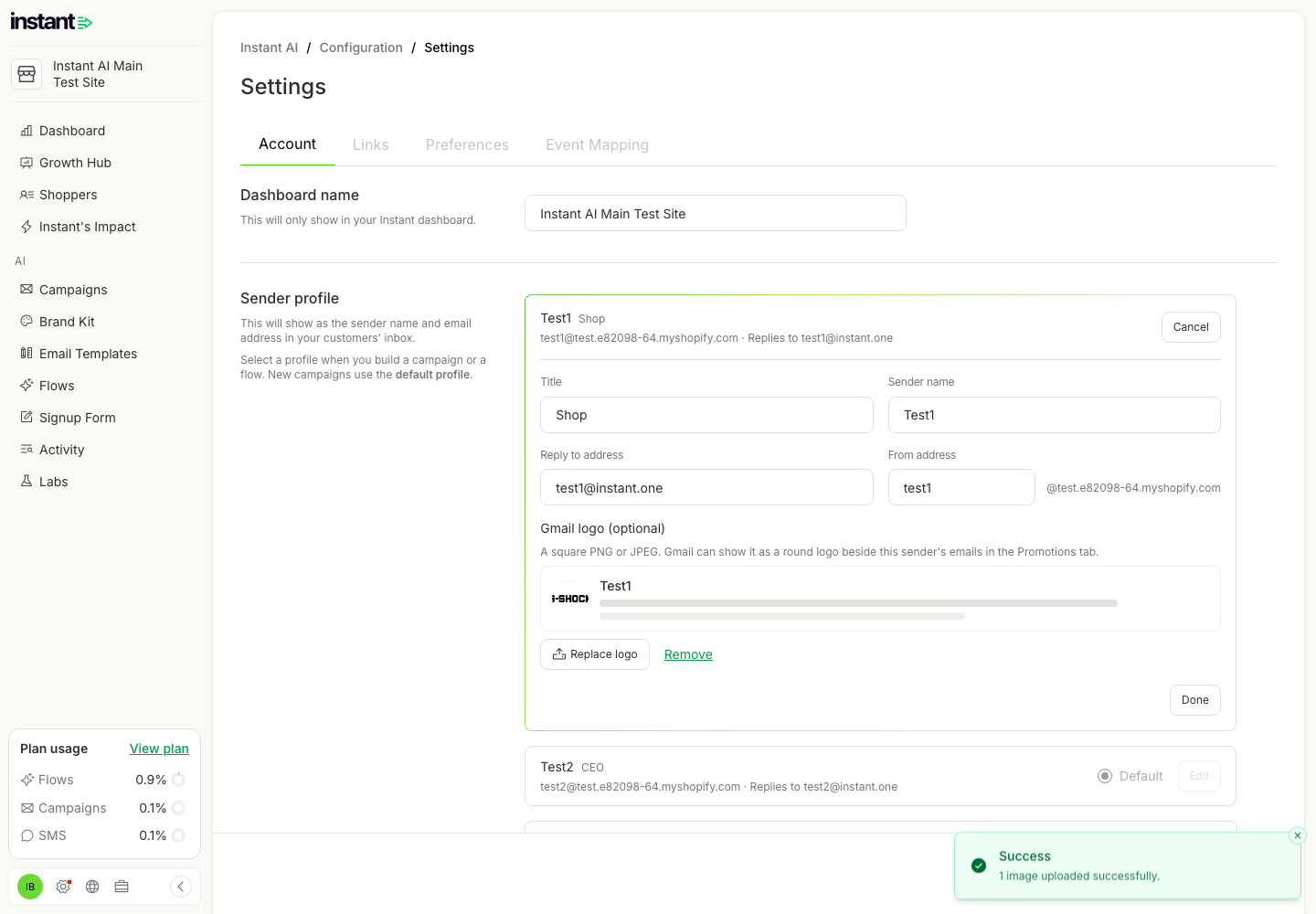
- Each sender gets the right logo with no HTML to paste, so a brand with several sender names keeps a consistent look in the inbox.
- Custom HTML pasted from another platform now keeps its Outlook fixes and markup, so it looks the same after the move.
- Each sender profile can now have a Gmail logo. Go to Settings → Account → Sender profile, click Edit on a profile, and upload a square PNG or JPEG under "Gmail logo (optional)".
- The upload crops the image to a square and shows a live preview of the round logo that Gmail draws, and of a Gmail inbox row.
- Every email from that sender carries the logo for Gmail. A brand that sends under more than one name can give each sender its own logo.
- A profile with a logo shows it as a small round image in the sender profile list.
- Custom HTML blocks now keep the email markup that other email platforms keep: Outlook-only sections and buttons, web font links, link targets, and schema.org markup such as a Gmail logo. They still remove scripts and other unsafe code.
- Logo uploads in the Brand Kit now open with the crop box centered on the image.