

Segment shoppers by mailbox provider
Merchants can now segment shoppers by mailbox provider, such as Gmail or Microsoft, and make a warm-up segment in one step.
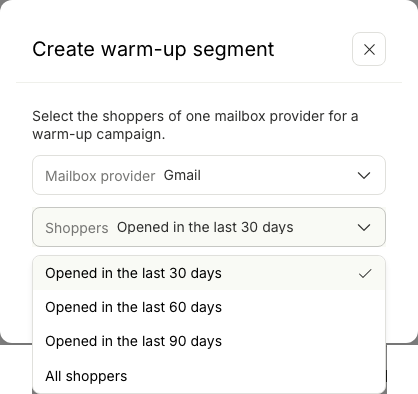
- Brands with poor inbox placement at one provider, such as Gmail, can warm up their sending domain: first campaigns to that provider's engaged shoppers, then to more shoppers each week.
- Before, a merchant had to type each domain. "Ends with @hotmail.com" alone missed about one third of Microsoft addresses. The new filter includes all of them.
- *Mailbox provider filter. In Shoppers, click the filter button → Mailbox provider. Select Is or Is not, then one or more of Gmail, Microsoft, Yahoo and Apple. The filter is also in the Advanced* builder, so you can combine it with any other condition.
- *Instant knows the domains.* "Microsoft" includes hotmail.com, outlook.com, live.com, msn.com and their country domains. "Yahoo" includes aol.com, ymail.com, and AT&T and Verizon addresses. You do not type any domain.
- *Create warm-up segment. In Shoppers, click ⋮ (top right) → Create warm-up segment. Select a provider, and Opened in the last 30, 60 or 90 days, or All shoppers. Then click Create segment*. Instant saves a segment such as "Engaged Gmail (30 days)". Select it as a campaign's audience.
- *Edit it later.* A warm-up segment opens with its two conditions (Mailbox provider and Email activity), and you can change both.
- *Email filter fix.* The Email filter now saves the value in lower case, so "ends with @Gmail.com" works. "Ends with" also shows the example "e.g. @gmail.com".