

Loyalty status on shopper profiles
See each shopper's loyalty tier and points balance on their profile, and filter your shoppers by them.
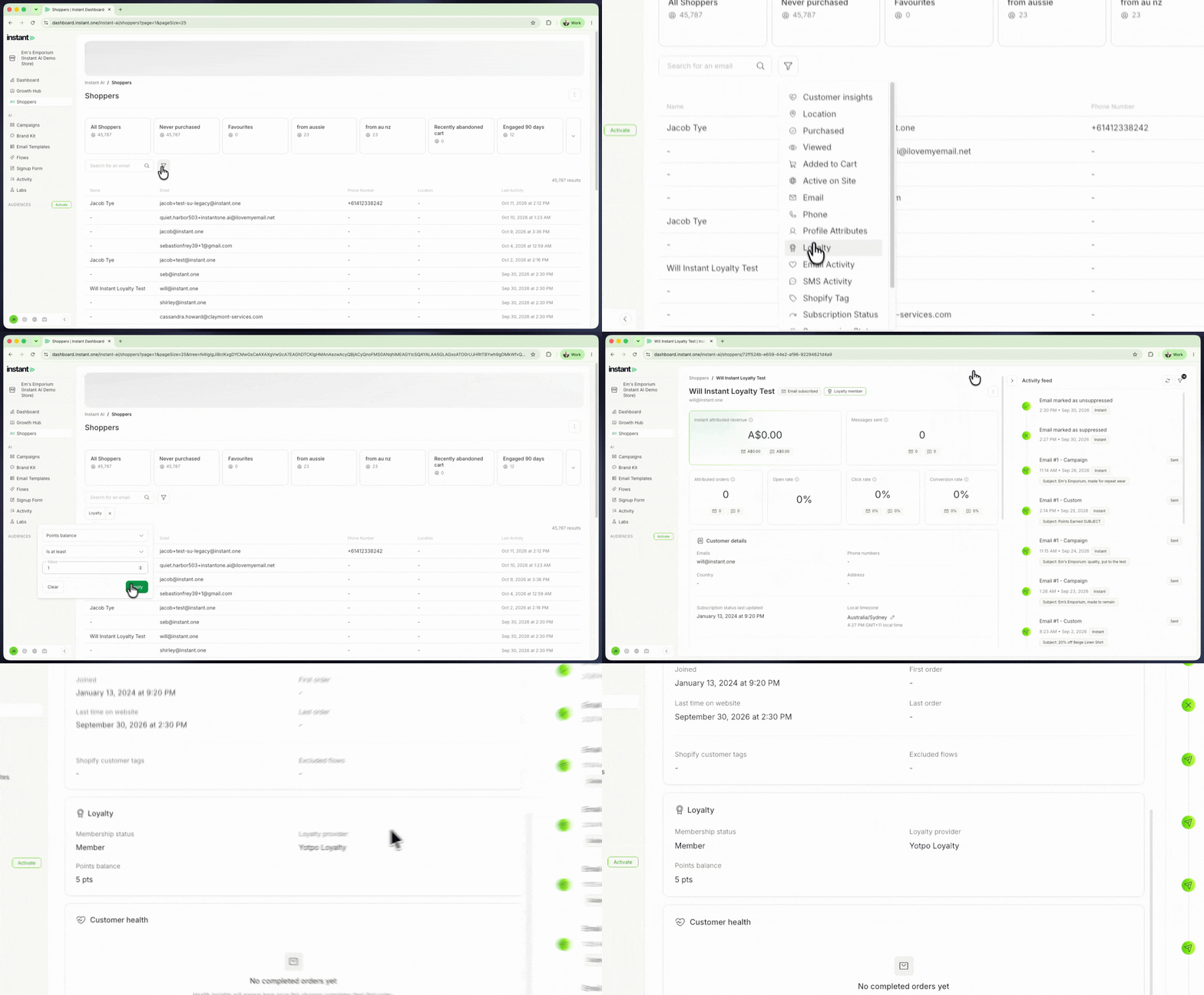
You no longer need to open Yotpo to check where a shopper sits in your loyalty program. Their tier, provider and points balance are on the same profile as everything else Instant knows about them. It also makes loyalty something you can target. Build a segment of your VIP tier members, or of shoppers with points to spend, and send them a campaign made for them.
- When you connect a loyalty app, each shopper profile gets a new Loyalty card with their membership status, VIP tier, loyalty provider and points balance
- Loyalty members also get a chip at the top of their profile, next to their subscription status, that shows their VIP tier (or "Loyalty member" if they have no tier)
- A new Loyalty filter on the Shoppers page lets you find shoppers by Points balance or VIP tier, for example "Points balance is at least 1"
- Save the filter as a segment to use it again in campaigns
- Find it under Shoppers > filter icon > Loyalty