

Choose the exact reviews in your emails
Merchants can now choose the exact reviews that a review block shows, and the order they show in.
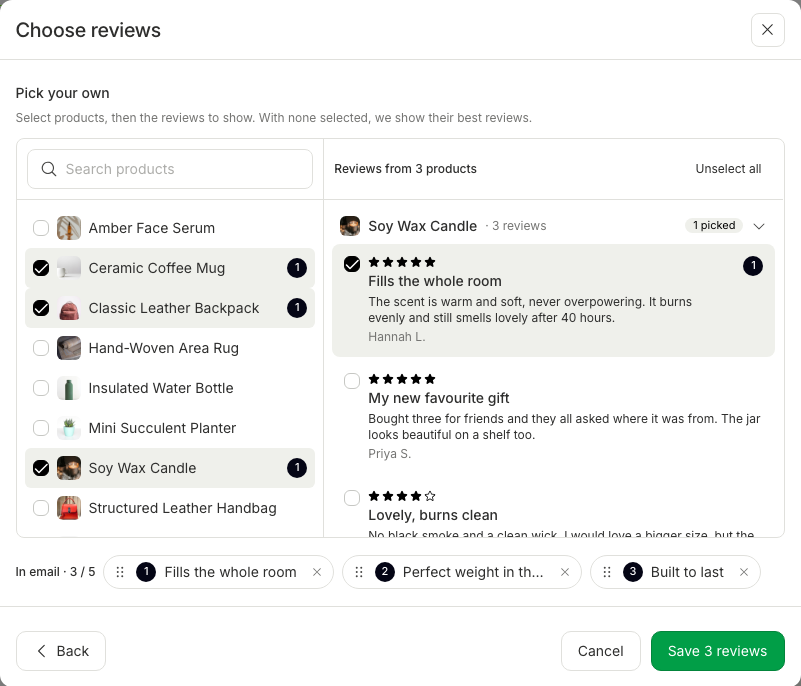
- Before, a merchant could choose only products for a review block, and Instant picked the reviews. Merchants could not feature the review that they liked best.
- Merchants who want a specific testimonial in a campaign can now pin it, in the position they want.
- Pinned reviews stay in the email, and another review block in the same email cannot take them.
- In the email editor, add a Review block (or select one), then click the pen icon next to Source.
- "Choose reviews" now opens with source cards, the same as "Choose products". Choose *Pick your own, then click Next*.
- On the left, search for products and select them. On the right, the reviews of those products show, grouped by product, with the highest rated first.
- Tick the reviews that you want to feature, up to the number that the block shows (5 at most).
- The picked reviews show in the *In email row at the bottom. Drag them to change their order, or click × to remove one. Unselect all* clears every pick.
- Click *Save N reviews*. The email shows exactly those reviews, in that order, and the side panel says, for example, "3 selected reviews from 2 products".
- With no reviews ticked, the block works as before and shows the best reviews of the products that you selected.